Most job seekers think a resume is just for full-time jobs. That is a limiting belief. Projects are the secret weapon that can showcase your skills, initiative, and problem-solving ability especially if you are changing careers, a recent graduate, or have employment gaps. They turn "what you could do" into "what you have done."
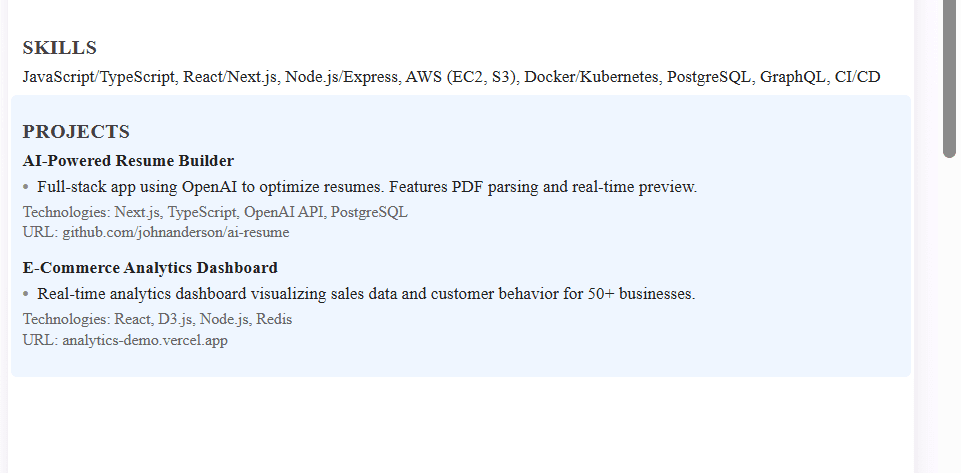
Our AI Resume Builder has a dedicated, optimized "Projects" section designed to help you structure and highlight your project work professionally. Whether it is a coding portfolio, a marketing campaign, or a freelance gig, our builder formats it to impress both ATS and hiring managers, turning your side work into compelling evidence.
Why Include Projects on Your Resume?
Projects are not just filler; they serve strategic purposes that can elevate your candidacy above others.
For Recent Graduates and Career Changers
- Proves Practical Skills: Shows you can apply theoretical knowledge from school or self-study to real-world problems.
- Compensates for Lack of Direct Experience: A well-documented project in your target field is often more convincing than an unrelated past job title.
- Demonstrates Initiative and Passion: Personal or academic projects show you go beyond requirements and are motivated to learn.
For Experienced Professionals
- Highlights Specific Expertise: Isolates and details a complex initiative that might get lost in a broader job description.
- Showcases Cross-Functional Work: Perfect for illustrating leadership, collaboration, or skills outside your core daily duties.
- Fills Employment Gaps Constructively: Shows productive use of time between jobs with freelance, volunteer, or passion projects.
The Universal Benefit: The STAR Method in Action
Projects are the perfect vehicle for the STAR (Situation, Task, Action, Result) method. They are self-contained stories where you can clearly define the problem, your role, the steps you took, and the quantifiable outcome exactly what interviewers want to hear.
When to Skip the Projects Section Entirely
While projects are powerful for many candidates, you can skip a dedicated projects section if you have 10+ years of highly relevant work experience. For senior professionals, your work history should speak for itself. You can also skip it if you are applying to highly structured traditional industries like law or accounting where only formal work experience counts. If space is very tight (you already have a full one-page resume without projects), prioritize work experience. And if your projects are weak or poorly documented (for example, a simple to-do list app from a weekend tutorial), including them can do more harm than good. Be honest with yourself about whether each project truly adds value. For experienced candidates, a single line under each job describing a key initiative often works better than a separate projects section.
Where to Put Projects on Your Resume
Placement depends on your experience level and the relevance of the projects to the job you want.
Option 1: Dedicated "Projects" Section (Most Common)
Place this section directly after your "Work Experience" section.
Best for: Students, recent graduates, career changers, tech professionals (developers, data analysts, UX designers), or anyone with several relevant side projects.
Why it works: It gives projects prominent, organized visibility, signaling they are a core part of your qualifications.
Option 2: Integrated Within "Work Experience"
List a major project as its own entry under the relevant job, or list freelance and contract work as separate job entries.
Best for: Consultants, freelancers, or employees who led a major, discrete initiative that deserves its own spotlight alongside their regular duties.
Why it works: Provides context and shows the project was part of your professional responsibilities.
Option 3: Within "Education" or a "Relevant Coursework" Section
Briefly describe key academic projects under your degree listing.
Best for: Entry-level candidates with no professional experience. Be concise.
Why it works: Connects theoretical learning to practical application directly under the degree that provided the knowledge.
How to Format Projects Section
Consistency is key. Format each project with the same structure for easy scanning.
The Standard Project Entry Format
Project Title, Your Role | Date (for example, "Fall 2023" or "Jan-Mar 2024")
- Context: Developed a [what] to solve [problem] for [audience].
- Action and Tools: Utilized [tools and skills] to [key actions taken], including [specific task].
- Result: Achieved [quantifiable outcome], resulting in [benefit].
Keywords to Use in Bullet Points
- Initiated, Led, Architected, Developed, Engineered, Designed, Implemented, Analyzed, Optimized, Launched.
- To: increase efficiency, reduce costs, improve accuracy, enhance user experience, automate processes, solve [specific problem].
- Resulting in: a certain percentage increase, a certain percentage reduction, saving X hours or dollars, improving a score or metric to X.
Academic Projects Examples
Transform class assignments into professional achievements.
Example 1: Computer Science or Data Analysis
Predictive Sales Dashboard, Data Analyst and Developer | Advanced Statistics Course, Spring 2024
- Developed a Python script using Pandas and Scikit-learn to analyze 10,000+ sales records and predict regional quarterly trends.
- Engineered a Tableau dashboard to visualize key insights, making complex data accessible to non-technical stakeholders.
- The model achieved 92% accuracy in test predictions, earning top marks in the course and providing a tool later adopted by the department for case studies.
Example 2: Marketing or Business
"EcoWear" Brand Launch Strategy, Marketing Lead | Capstone Business Project, Fall 2023
- Led a 4-person team to create a comprehensive GTM strategy for a hypothetical sustainable apparel brand, including market analysis, persona development, and channel strategy.
- Developed a full social media content calendar and sample ad creatives, focusing on Instagram and TikTok platforms.
- Presented the 50-page plan to a panel of local marketing executives; the strategy was praised for its data-backed approach and won the program's "Most Viable Business" award.
Personal and Portfolio Projects Examples
Showcase self-driven learning and passion.
Example 1: Web Development Portfolio Project
Local Restaurant Finder Web App, Full-Stack Developer | Personal Project, 2024
- Built a responsive React.js frontend with a Node.js and Express backend to help users find and review local restaurants using the Google Maps API.
- Implemented user authentication, review posting, and favorite saving features with a MongoDB database.
- Deployed the application; it currently has active users and serves as the central piece of my development portfolio.
Example 2: Digital Marketing and Content Creation
Personal Finance Blog and Newsletter, Creator and SEO Manager | Side Project, 2023-Present
- Researched, wrote, and published 25+ long-form SEO-optimized articles on personal finance topics, targeting low-competition keywords.
- Grew an email newsletter to hundreds of subscribers using content upgrades and social media promotion (primarily LinkedIn and Twitter).
- Increased organic blog traffic significantly in 6 months; one article ranks well for "student budget tips," driving consistent daily traffic.
Freelance and Contract Projects
Treat significant freelance work like professional experience.
How to Format Freelance Work
Freelance [Your Role], Self-Employed | City, State | Dates (for example, 2022-Present)
Client: Project Name, Month Year
- Bullet points describing the work and results for this specific client or project.
Client: Another Project Name, Month Year
- Bullet points for this project.
Freelance Writer Example
Freelance Content Writer, Self-Employed | Remote | 2023-Present
Client: TechStart Inc. (B2B SaaS Blog), Jan 2024 - Present
- Write 4 blog posts monthly on SaaS growth strategies, conducting keyword research and interviews with subject matter experts.
- Articles have a strong average read time and have generated qualified leads.
Client: GreenLife Magazine, Aug - Dec 2023
- Researched and wrote 2 feature articles on sustainable urban living, which were among the magazine's top-read online pieces for Q4.
Team Projects and Leadership Roles
Highlight collaboration and soft skills.
Example: Engineering Team Project
Automated Customer Support Chatbot, Project Lead and Backend Developer | Hackathon Project, 2024
- Led a team of 3 developers through a 48-hour hackathon to build a prototype using Python, NLP libraries, and a simple UI.
- Delegated tasks (frontend, backend, NLP logic), managed the project timeline via GitHub Projects, and handled the client pitch presentation.
- Our prototype, which reduced simulated response time significantly, won 2nd place out of many teams for "Most Practical Business Solution."
Key Skills Showcased: Leadership, Agile Project Management, Technical Execution, Public Speaking.
GitHub and Portfolio Links
Here is how to integrate them without cluttering your resume.
Best Practices for Links:
- In Your Contact Info: Add a clean, customized LinkedIn URL and a link to your main portfolio site (for example, yourname.com or Behance, Dribbble, or GitHub profile).
- Within the Project Entry: If a project has a live demo or specific repository, include a short, clean link in parentheses at the end of the project title or final bullet point.
Example: E-Commerce UI Redesign (github.com/yourname/repo) | View live demo: yourname.com/project - Never write: "Click here to see my GitHub." Simply provide the URL. For ATS, ensure the link is a standard hyperlink.
Projects vs Experience: When to Use Each
Knowing when to highlight a project separately is a strategic decision.
List it as a "Project" if:
- It was a short-term, discrete initiative with a clear beginning and end.
- It was done outside of paid employment (academic, personal, volunteer).
- It is highly relevant to your target job but was a small part of a previous role that was otherwise unrelated.
- You need to compensate for limited traditional work experience.
Keep it within "Work Experience" if:
- It was a core, ongoing responsibility of your paid role.
- Describing it within the job gives it better context and scale.
- Your work history is already strong, and the project does not need isolated emphasis.
Common Project Listing Mistakes
The "Grocery List" Mistake
Mistake: "Used Python, JavaScript, React, MongoDB, Docker, AWS..." just listing technologies without context.
Fix: Weave tools into action-oriented bullet points. "Built the frontend using React and containerized the application with Docker for deployment on AWS."
The "Vague Outcome" Mistake
Mistake: "Successfully created a website that was well-received."
Fix: Quantify. "Launched a website that reduced page load speed by 40%, contributing to a 15% increase in user sign-ups."
The "Missing Role" Mistake
Mistake: Not stating your specific contribution in a team project.
Fix: Always state your role. "As the Data Modeler, I was responsible for..." This clarifies your individual impact.
The "Irrelevant Project" Mistake
Mistake: Including every project you have ever done, regardless of relevance.
Fix: Curate ruthlessly. Include only projects that demonstrate skills or achievements relevant to the job you are applying for. For a marketing role, your Python data scraping project is less relevant than your blog growth project.
FAQ: Projects on Resume Questions
How do I list personal projects on a resume?
Answer: Create a "Projects" section. For each, provide a Project Title, your Role, and the Date. Use 2-3 bullet points following the Context-Action-Result framework. Focus on what you built, how you built it, and the impact or what you learned.
Where do you put academic projects on a resume?
Answer: The best place is in a dedicated "Academic Projects" subsection within your "Education" section, or in a standalone "Projects" section if they are a major part of your qualifications. Format them with the same rigor as professional projects.
Should I include projects from Coursera or online courses?
Answer: Yes, if they are substantial and relevant. Do not list every simple course exercise. Choose a major capstone or multi-step project that required significant application of skills. Title it clearly (for example, "Credit Risk Analysis - Coursera Data Science Capstone").
How many projects should I list?
Answer: 2-4 highly relevant projects is ideal. Quality over quantity. Choose the projects that best demonstrate the skills required for the job and tell the most compelling story about your abilities.
Do I need a projects section if I have 10+ years of experience?
Answer: Typically, no. Your extensive work experience should showcase your skills. However, a separate "Selected Projects" or "Key Initiatives" section can be powerful if you want to highlight a few massively impactful, discrete achievements from across your career that might get lost in chronological job descriptions.
Final Checklist: Is Your Projects Section Strong?
- Relevant: Each project demonstrates skills directly related to the target job.
- Structured: Each has a clear Title, Role, and Date.
- Action Oriented: Bullet points start with strong action verbs (Developed, Led, Analyzed).
- Quantified: Results include numbers, percentages, or concrete outcomes where possible.
- Concise: 2-3 bullet points per project; easy to scan.
- Tool Centric: Key technologies and methodologies are mentioned within the context of use.
- Role Clear: Your specific contribution in team projects is explicitly stated.
- Linked: Relevant live demos or repositories are included via clean URLs.
- Well Placed: The section is positioned strategically based on your experience level (after Work Experience for most).
- Error Free: All links work, and the text is free of typos and grammatical errors.