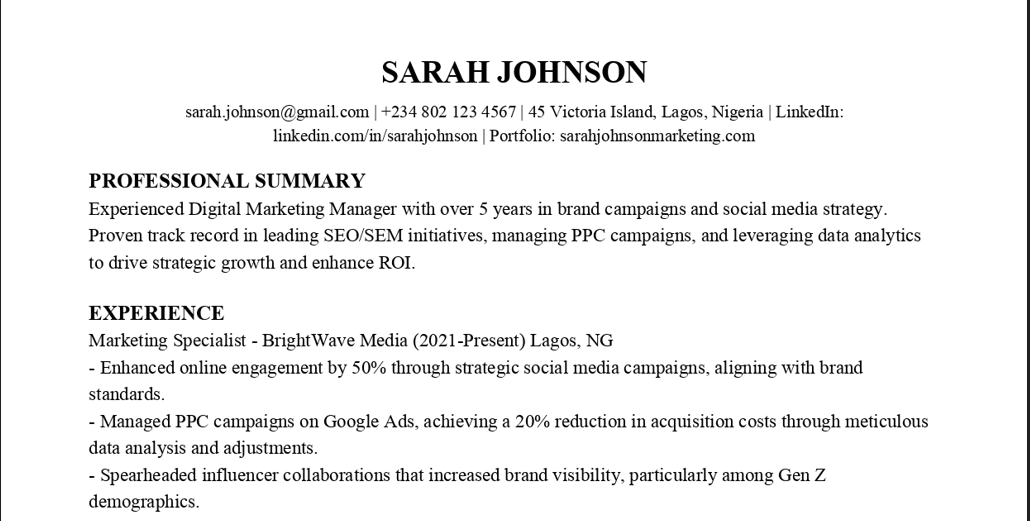
Your resume header is the first thing recruiters and ATS systems see, yet most job seekers treat it as an afterthought. A strong header immediately establishes professionalism and makes your contact information easily accessible, while a weak one can cause confusion or even lead to your resume being overlooked entirely.
Our AI Resume Builder automatically creates professionally formatted resume headers that are ATS-friendly, visually balanced, and include all necessary information. Based on thousands of successful resumes, our headers ensure you make the right first impression every time.
What is a Resume Header?
A resume header is the section at the top of your resume that contains your contact information and professional identifiers. It is not just your name and contact details it is your professional introduction to potential employers.
Purpose of the Resume Header
- Identification: Clearly states who you are
- Accessibility: Provides multiple ways to contact you
- Professionalism: Sets the tone for the entire resume
- ATS Compatibility: Structured for easy parsing by applicant tracking systems
- Branding: Your first opportunity to present yourself professionally
What Makes a Header Effective
- Clarity: Information is easy to read and understand
- Completeness: Includes all necessary contact methods
- Consistency: Matches the style of your cover letter and other documents
- Professionalism: Appropriate for your industry and target roles
- Accessibility: Contact information is immediately usable
When a Minimal Header Is Better
The detailed headers shown below work well for most professional roles. However, a minimal header is often better for creative fields like graphic design or art direction where visual restraint signals confidence. For academic or research positions, a simpler header allows more space for publications and grants. For internal job applications where the hiring manager already knows you, a minimal header with just your name and email is sufficient. The key is matching the header's complexity to your industry norms and the specific role's expectations. When in doubt, review the headers on LinkedIn profiles of people already working at your target company.
What to Put in a Resume Header
The content of your header depends on your experience level, industry, and personal preferences. Here is what to consider including.
Essential Information (Always Include)
- Full Name: Your professional name (as you want to be addressed)
- Phone Number: Mobile preferred, with professional voicemail
- Email Address: Professional format (first.last@email.com)
- Location: City and State (full address not needed)
Recommended Additions
- LinkedIn URL: Customized profile link (linkedin.com/in/yourname)
- Portfolio Link: For designers, developers, creatives
- GitHub Profile: For developers, data scientists, tech roles
- Professional Website or Blog: If relevant to your field
Optional (Industry-Specific)
- License or Certification Numbers: For healthcare, finance, legal
- Security Clearance: For government or defense contractors
- Professional Designations: PhD, CPA, PE, etc. after your name
Resume Header Format (With Examples)
Formatting matters as much as content. Here are the most effective formats.
Centered Header (Most Common)
Alexandra Chen
San Francisco, CA | (415) 555-1234 | alexandra.chen@email.com
linkedin.com/in/alexandrachen | github.com/alexchen
Left-Aligned Header (Professional)
Michael Rodriguez
New York, NY
(212) 555-6789 | michael.rodriguez@email.com
linkedin.com/in/michaelrodriguez | michaelrodriguez.design
Two-Column Header (Space Efficient)
Sarah Johnson | Chicago, IL
(312) 555-9012 | sarah.johnson@email.com | linkedin.com/in/sarahjohnson
Good Resume Header Examples
These examples show effective headers for different situations.
Entry-Level Professional
Taylor Wilson
Austin, TX | (512) 555-3456 | taylor.wilson@email.com
linkedin.com/in/taylorwilson | taylorwilsonportfolio.com
Senior Executive
Robert Kim, MBA
Boston, MA | (617) 555-7890 | robert.kim@email.com
linkedin.com/in/robertkim
Technical Professional
Jamie Patel
Seattle, WA | (206) 555-2345 | jamie.patel@email.com
linkedin.com/in/jamiepatel | github.com/jamiepatel | jamiepatel.dev
Bad Resume Header Examples (What to Avoid)
These common mistakes can hurt your chances.
Too Much Information
Problem: "John Smith | 123 Main St, Apt 4B, Anytown, CA 12345 | (555) 123-4567 | john.smith@gmail.com | linkedin.com/in/johnsmith | twitter.com/johnsmith | instagram.com/johnsmith | facebook.com/johnsmith | johnsmithblog.com | (555) 987-6543 (home) | john@oldemail.com"
Issue: Overwhelming, includes personal social media, multiple phone numbers, full address.
Unprofessional Email
Problem: "coolguy92@hotmail.com" or "partyanimal@gmail.com"
Issue: Unprofessional, suggests immaturity.
Missing Key Information
Problem: "Jennifer Lee | jennifer.lee@email.com"
Issue: No phone number, no location, no LinkedIn.
Resume Header for Students
Students and recent graduates have unique considerations.
Student-Specific Information to Include
- Campus and Permanent Addresses: If relevant to job location
- Graduation Date: Month and year
- Relevant Coursework: If space allows in a concise format
- Academic Projects Portfolio: For technical or creative fields
- Student Organizations: Leadership roles if relevant
Example Student Header
Maya Thompson
University of Michigan | Expected Graduation: May 2024
(734) 555-6789 | maya.thompson@email.com | Ann Arbor, MI
linkedin.com/in/mayathompson | github.com/mayathompson
FAQ: Resume Header Questions
Should I include my full address?
Answer: No. City and State are sufficient. Full addresses can raise privacy concerns and are rarely needed until later in the hiring process.
What email address should I use?
Answer: Professional format: first.last@email.com. Avoid numbers, nicknames, or outdated providers like AOL or Hotmail.
Do I need a LinkedIn profile?
Answer: Highly recommended. A large percentage of recruiters use LinkedIn regularly. Ensure your profile is complete and professional before including it.
Should I put my title in the header?
Answer: Only if it is a recognized professional designation (MD, PhD, PE) or you are at an executive level. Otherwise, let your experience speak for itself.
Can I use graphics or logos in my header?
Answer: Generally no. Graphics can break ATS parsing. Exception: creative industries where you are submitting a PDF directly to a human.
Final Checklist for Resume Headers
- Name: Professional, as you want to be addressed
- Phone: Mobile with professional voicemail
- Email: Professional address (first.last@email.com)
- Location: City and State only
- LinkedIn: Custom URL, profile complete and professional
- Portfolio Links: If relevant to your field
- Formatting: Clean, balanced, easy to read
- ATS Tested: Information parses correctly in screening systems
- Consistency: Matches cover letter and other application materials
- Professionalism: Appropriate for your target industry and roles