Most job seekers think their resume is read by a human first. That is wrong. Many resumes are screened out by Applicant Tracking Systems (ATS) before a human ever sees them. This critical misunderstanding leads to beautifully designed resumes that are completely invisible to employers.
Our AI Resume Builder is engineered to bypass this first gatekeeper. It automatically structures your resume with ATS-friendly formatting, strategic keyword placement, and the right sections in the right order. This technical optimization gets candidates more interviews by ensuring their resume is readable before it is ever read.
What is ATS Resume Format?
An ATS Resume Format is a structural and stylistic approach to resume writing designed specifically for compatibility with Applicant Tracking System software. These systems act as digital gatekeepers, scanning, parsing, and ranking your resume based on its content and format.
Think of it as writing for two audiences:
1. The Bot: Needs clear structure, standard headings, and relevant keywords to give you a high match score.
2. The Human: Needs a clean, professional, and compelling document once the bot approves it.
A proper ATS format ensures your resume is not discarded due to parsing errors, missing information, or incompatible design elements. It is the foundation upon which all other resume advice is built.
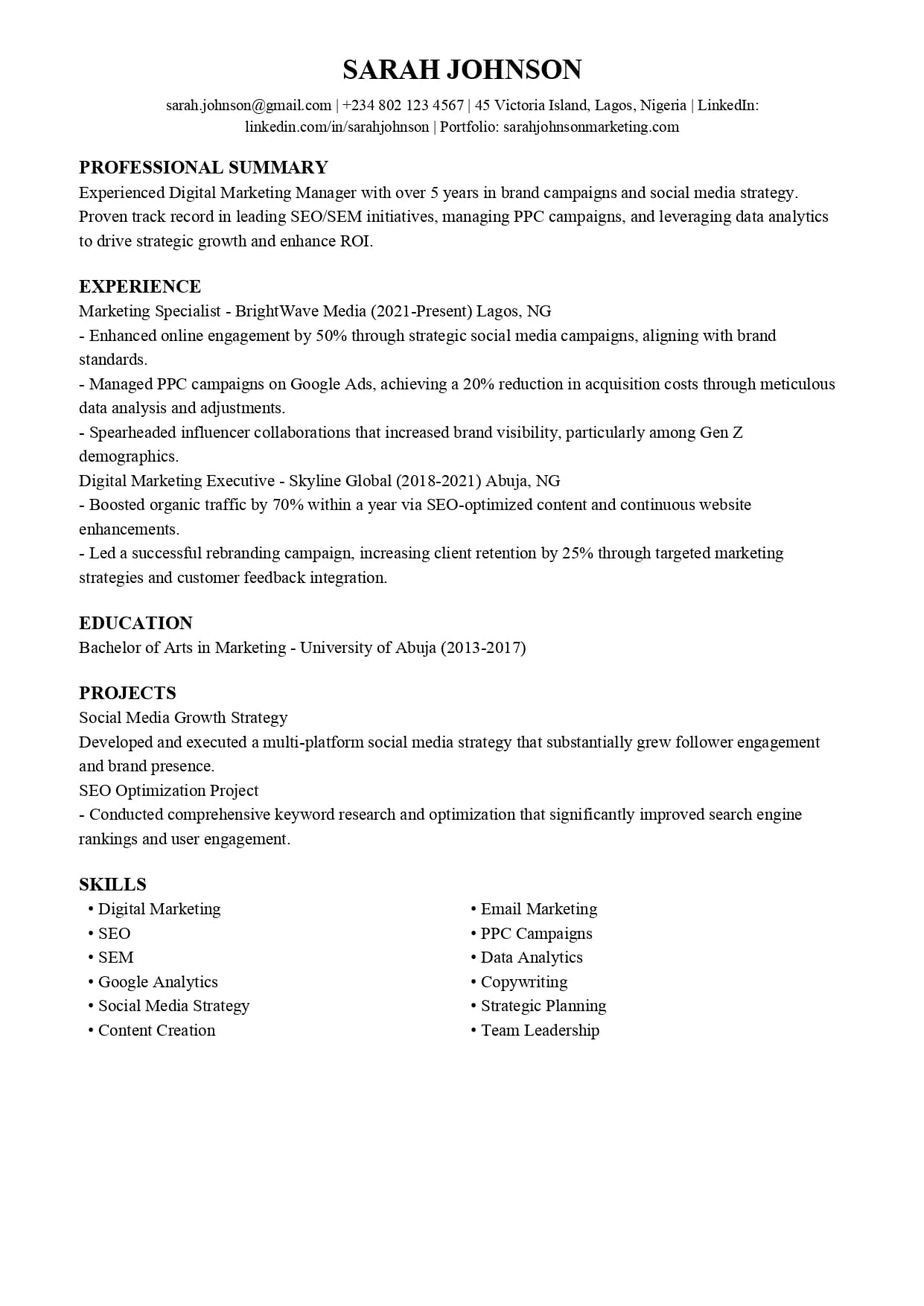
ATS-Friendly Resume Structure
The order of your resume sections is crucial for ATS parsing. Follow this top-down structure for maximum compatibility.
1. Contact Information
- Must Include: Full Name, Phone Number, Email Address, City and State.
- Avoid: Headers, footers, or tables for contact info. Place it at the very top of the document.
- Optional but Good: LinkedIn URL (make sure it is customized).
2. Professional Summary (or Resume Objective)
- A 2-3 line paragraph at the top summarizing your key qualifications.
- This is prime real estate for target keywords from the job description.
- The ATS scans this section heavily for initial relevance.
3. Work Experience
- List in reverse-chronological order (most recent job first).
- Use standard job title headers (for example, "Marketing Manager").
- For each bullet point, start with a strong action verb and quantify achievements.
4. Skills Section
- Create a dedicated "Skills" or "Core Competencies" section.
- Use a mix of hard skills (for example, "Python," "Google Analytics") and soft skills.
- This is a keyword goldmine for the ATS. Mirror the language from the job ad.
5. Education
- Use standard headings like "Education."
- Include: Degree, University, Graduation Year (or "Expected").
- For recent graduates, this can go higher. For experienced candidates, it goes here.
When to Break ATS Formatting Rules
The ATS-friendly rules above apply to most corporate and professional roles. However, you can break them in specific situations. If you are applying to a very small company (under 50 employees) that uses no automated screening, a more creative format can help you stand out. If you are in a purely creative field like graphic design or art direction where your resume is expected to demonstrate design skills, a visually interesting format may be appropriate. If the job is a referral where the hiring manager expects your resume directly, you have more flexibility. And if the job posting explicitly says "email your resume to the hiring manager," you are likely bypassing ATS entirely. For the vast majority of online applications through corporate portals, follow the ATS rules strictly. When in doubt, prioritize machine readability.
ATS Resume Format Rules
Follow these non-negotiable technical rules to ensure your resume passes the ATS scan.
1. Use a Simple, Standard Font
Stick to ATS-friendly fonts like Arial, Calibri, Georgia, Helvetica, or Times New Roman. Avoid fancy or script fonts that may not render correctly.
2. Avoid Headers, Footers, and Tables
ATS software often cannot read text placed in headers, footers, or within complex tables and columns. This information may be lost entirely, deleting your contact info or key skills.
3. Save Your File Correctly
- Best Format: .docx (most universally compatible).
- Acceptable Format: .pdf (but only if you have created it from a Word document or builder; avoid scanned PDFs).
- File Name: Use your name: FirstName_LastName_Resume.docx
4. Use Standard Section Headings
Label your sections with common, easily parsed titles. The ATS is programmed to look for them.
Use: "Work Experience," "Professional Experience," "Education," "Skills," "Summary."
Avoid: "Where I Have Been," "My Academia," "Skill Set."
5. Incorporate Keywords Naturally
Identify key terms from the job description (like specific software, methodologies, or certifications) and weave them into your bullet points. Do not just list them in a hidden "keyword dump."
ATS Resume Format Examples
See the difference between an ATS-friendly and an ATS-hostile resume.
ATS-Friendly Example (Experience Bullet)
Marketing Manager
ABC Corp, Jan 2020 – Present
- Increased organic website traffic by 150% in 12 months via SEO and content strategy.
- Managed a $500k annual digital ad budget, achieving a 22% lower CPA than industry average.
- Led a team of 5 content creators; implemented project management with Asana.
ATS-Unfriendly Example (Same Experience)
Problem: "I successfully grew our web presence and managed a large budget with my awesome team. We used cool tools to get things done."
Issue: Vague language lacks keywords. No quantifiable metrics. No specific tool names.
Common ATS Format Mistakes
Using Graphics, Icons, and Charts
The Problem: ATS reads text, not images. Any vital information inside a graphic is lost.
The Fix: Describe achievements with words and numbers.
Creative or Two-Column Layouts
The Problem: ATS reads left to right, top to bottom. Text in a sidebar may be read in the wrong order, creating gibberish.
The Fix: Use a single-column format for ATS submissions.
Fancy Fonts and Text Boxes
The Problem: Uncommon fonts may not be in the ATS library, causing substitution or errors. Text boxes can confuse parsers.
The Fix: Use standard fonts and simple paragraph and text formatting.
Saving as a .pages or Scanned PDF
The Problem: .pages files are for Mac only. A scanned PDF is just an image completely unreadable by ATS.
The Fix: Save as a .docx or a text-based .pdf.
How to Check Your Resume's ATS Compatibility
Before you hit submit, run these checks.
- The Copy-Paste Test: Copy your entire resume into a plain text editor (like Notepad). If the text is jumbled, missing, or out of order, the ATS will see the same mess.
- Keyword Match: Compare your resume's language to the job description. Do the key terms appear?
- File Properties: Right-click your file to confirm it is a .docx or text-based PDF, not an image.
ATS Resume Format for Different Industries
Creative Fields (Design, Marketing)
You still need a clean, text-based ATS resume. Save your beautiful portfolio for a linked website or a separate PDF attachment. The ATS resume is your key to the door; the portfolio is what you show once you are inside.
Technical Fields (Engineering, IT)
Your Skills section is critical. List programming languages, frameworks, tools, and certifications explicitly. Use exact acronyms (AWS, SQL, Kubernetes) as they appear in the job description.
Academic and Research
CVs are longer, but ATS principles remain. Use clear headings for "Publications," "Research Experience," and "Grants." Avoid complex formatting in citations.
Corporate Roles (Finance, Operations, HR)
Emphasize metrics and standardized terminology (for example, "P and L Management," "SOP Development," "HRIS"). Quantify every achievement with numbers (percentages, dollar amounts, time saved).
FAQ: ATS Resume Format Questions
What is the best ATS resume format?
Answer: The best format is a reverse-chronological, single-column layout using standard headings and a common font like Arial or Times New Roman, saved as a .docx file. This is the most universally parseable format.
Can ATS read a PDF resume?
Answer: Yes, but with a major caveat. ATS can read text-based PDFs (created from Word or a resume builder). It cannot read scanned PDFs or image-based PDFs, which it treats as a blank page. When in doubt, use .docx.
How to format a resume for ATS with no experience?
Answer: Follow the same rules. Structure your resume with Contact Info, a strong Objective, an Education section, a detailed Projects section, and a Skills section. Use academic, volunteer, or personal projects to demonstrate keywords and competencies.
Do I need a different resume for every job application?
Answer: Yes. The core ATS format stays the same, but you must tailor the keywords in your summary, skills, and experience bullets to match each specific job description. This is the most crucial step for a high ATS score.
What is an ATS format resume example for Word?
Answer: An ATS-friendly Word resume uses standard heading styles, has 1-inch margins, uses simple bullet points, and avoids text boxes or WordArt.
Final Checklist: Is Your Resume ATS-Ready?
- Simple Font: Using Arial, Calibri, Times New Roman, or Georgia?
- No Headers or Footers: Contact information is in the main body of the document?
- Correct File Type: Saved as a .docx or text-based .pdf?
- Standard Headings: Using "Work Experience," "Education," "Skills"?
- No Graphics or Tables: All text is selectable and not inside images or complex columns?
- Keyword-Rich: Mirrors key terms from the job description?
- Simple Bullet Points: Uses standard round or square bullets?
- Clean Formatting: Passes the "Copy-Paste into Notepad" test?
- Logical Order: Follows Contact Info, Summary, Experience, Skills, Education?
- Tailored: Customized for this specific job application?